
What does this mean?
An input, button or link has been found set to disabled or readonly.
For example:
<a href="..." disabled>Link</a>
or
<button disabled type="submit">Save and continue</button>
or
<label for="ref">Reference number</label>
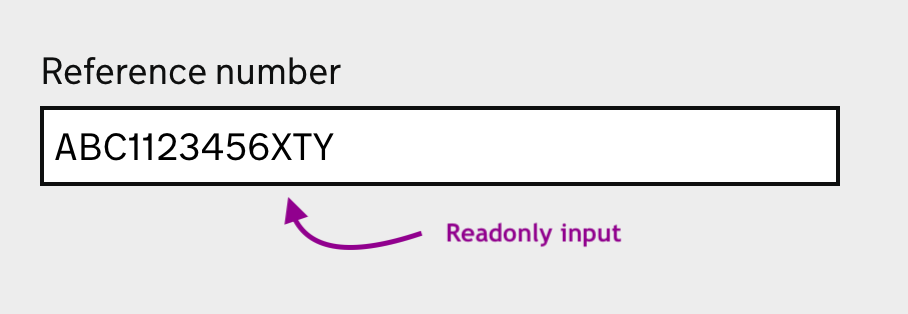
<input type="text" id="ref" readonly value="ABC1123456XTY">
Which renders like this:
Impact on users
Disabled or readonly controls are not always obviously disabled to the user, especially if there are not active fieldsd adjacent with which to compare. This can lead to users trying to interact with the controls and becoming frustrated when they don't appear to be working.
Disabled fields can also be more difficult to percieve due to their often greyed-out styling (which tends to be low contrast as they are exempt from WCAG contrast criteria but which does not really help). For readonly fields this is even more problematic as there is often no visual indication that they are not standard fields.
Often there is no explanation given as to why a control has been disabled or what the user might do in order for it to be enabled.
For keyboard users disabled controls do not take focus, so this makes them more difficult to percieve.
How to fix
Don't disable any controls.
If you feel the need to use disabled or readonly on an input then just use plain text instead for the data. This prevents a user thinking they can interact with it like any other input.
With our reference number example instead of a readonly input:
Present the data to the user as a key-value pairing, making it clear to the user the two are related but also that it cannot be edited:

With buttons the best solution is often to allow the user to action the button and handle the outcome with an interruption page or error message. Avoid removing the button entirely as it can leave the user wondering how to proceed.
One exception to this is where we might want to prevent double submissions (where a user clicks a submit button twice quickly). Here it can be useful to temporaily disable the submit button once it has been clicked, but ensuring that there is some sort of timeout to re-enable it in case the submission actually doesn't work to avoid leaving the user stranded.
References
- Don't disable form controls - Adrian Roselli
- The problem with disabled buttons and what to do instead - Adam Siver