
What does this mean?
The field looks like it might benefit from having an inputmode attribute, but one is not currently present.
Impact on users
The inputmode attribute serves as a hint to the browser as to what kind of virtual keyboard should be displayed to the user (on mobile and other touch-screen devices).
Without this attribute the user might need to perform additional actions to access the characters they need to enter the data. For users who have fine motor control issues or rely on assistive technology (such as speech-recognition or screen-readers) or who have low technical knowledge this can make adding data more difficult.
For example this month field is asking for a numeric input (such as "12" for December) but the current field will present most users with an letter-based keyboard:
<label for="month">Month</label>
<input type="text" id="month">
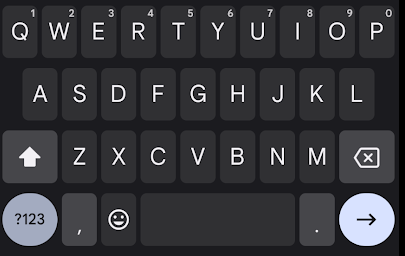
Presenting the incorrect keyboard might also suggest to the user that the field is expecting data in that format. In our example above the user might expect they should type in "December".
How to fix
There are a number of different inputmode values which can be applied based on the data being requested.
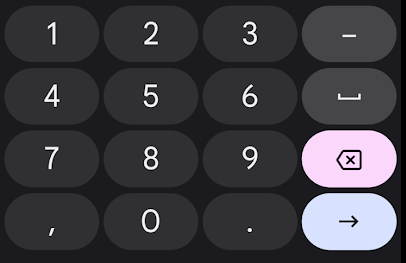
For most instances it is likely numeric that you may be reaching for. This as it suggests is for numbers and shows a number keypad (on some devices this may add numbers above the standard keyboard).
By adding a correct inputmode="numeric" to our example it now means the user can quickly enter the correct data without having to switch keyboards:
<label for="month">Month</label>
<input type="text" id="month" inputmode="numeric">
Note you should not use type="number" instead of inputmode="numeric" as this has many usability issues.
Whilst there is also inputmode="decimal" for fractional numbers (seemingly a good fit for currency fields) you should avoid using this (or at least test rigourously with target devices) as it can cause issues for users of some devices.
The following inputmodes are also available, but you could use the associated type attribute instead (note this will trigger native browser validation which will need to be turned off):
tel- for phone numbers, shows the phone keypad (look at usingtype="tel")search- a keyboard where the enter key might be switched out for one with the word "Search" (look at usingtype="search")email- a keyboard which includes the "@" symbol and potentially other email address assistance (look at usingtype="email")url- a keyboard with characters used in urls such as "/" (look at usingtype="url")