
What does this mean?
This warning is shown when a form would trigger native browser validation, due to one of several attributes being set on an input, and native validation has not been turned off.
Native browser validation (sometimes called "HTML5 validation" or "Constraint validation") presents some basic client-side form validation checks and error messages without the use of javascript. Whilst appealing to use it can cause accessibility issues for users.
This native validation is automatically enabled when a form uses one or more of a set of input types or attributes (including pattern, minlength, maxlength, required and email).
For example this will trigger browser validation because it has a type="email" attribute on the input:
<form action="..." method="post">
    <label for="email">What is your email address?</label>
    <input type="email" id="email">
    <button type="submit">Save and continue</button>
</form>
Which would look like this with a native error message:
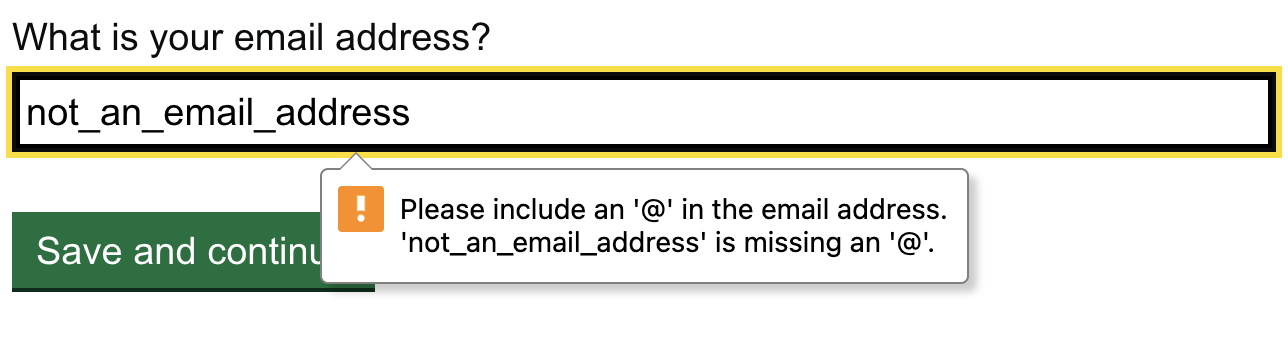
Note - unless the above also has a required attribute it will only show the native validation on an invalid entry (i.e. a badly formatted email address), not an empty entry. So you can have the situation where a field shows server-side messages for empty fields and when you enter a invalid data it then shows the native validation.
Because how this native validation is presented not very good from an accessibility perspective and we want to ensure error styling and messaging is consistent across all fields and services this feature should be turned off.
Impact on users
The native validation is poor out-of-the-box.
- they are only triggered on the first invalid input - if you have several fields with errors the user will have to submit after fixing each one to find the next error
- the error message is contained in a popover which disappears as the user tabs through the page
- once the popover disappears there is no way to retrieve the error message
- the programmatic error state of the input is only present as long as the error message is visible, so if the message is dismissed by mistake the user will need to resubmit the form to find out which field had the error
- the default error messages are not always good
- supplying more than a single alternate langauge error message becomes complex (often fields needs more than a single error to handle different situations)
- they do not respect a user's font-size setting
- they do not respond to page zoom without having being regenerated
- only the error bubble indicates there is an error on the field - there is no other visual indication
How to fix
Ensure server-side error validation and messaging is in place for when native validation is turned off.
Add novalidate attribute (no value assigned) to the form element. It is also possible to add a formnovalidate attribute instead to the submit button for the form. It is recommended that you add the novalidate attribute to your form template so it is present on all forms and need not be applied to each in turn.
Do not replace the attributes which trigger this feature (such as type="email") as they can have useful usability and accessibilty benefits.
For UK government services we should avoid using the required attribute anyway as optional fields are the exception rather than the rule - almost all fields will be required as policy is not to ask questions which are not necessary. See required attribute issue for more on this.
Note that for completeness, there are ways of improving the native validation but they all rely on turning off the native visual elements and using the API to find fields with errors and passing this to a custom message display functionality, but this is a complex route and can hold accessibility traps of its own so it is recommended to avoid this.