
What does this mean?
The field has either a minlength attribute, a maxlength attribute or both.
For example:
<input type="text" id="name" name="name" maxlength="30">
Impact on users
The impact depends on the attribute used. Note that both of these attributes will trigger native browser validation if it has not been turned off.
We are going to assume that native browser validation has been turned off when examining this issue.
Minlength
This is an issue primarily as it triggers native browser validation, so ensure that is turned off. With native browser validation turned off and no other client-side validation in place there is no advantage to using this attribute so it can be removed.
You should also check that a restriction which is enforced by custom validation (server or client-side) is checked for the following:
- Check that a minimum length restriction and accompanying server-side validation could not potentially prevent a user entering valid data. For example by restricting a "first name" field to 3 characters or more would prevent entering "Jo", "Li" or "Mi".
- If you are sure it will not prevent valid entry, you should also make sure the user is made aware of the restriction (for example via hint copy).
Maxlength
Maxlength is more of an issue as it directly affects how the input behaves regardless of the presence of novalidate. When the data entered hits the number in the attribute the input will stop taking any further input and this causes the issue.
The fact that the input has stopped taking any more input is not communicated to the user, so it is dependent on the user seeing this happen and it is likely that the user will not realise.
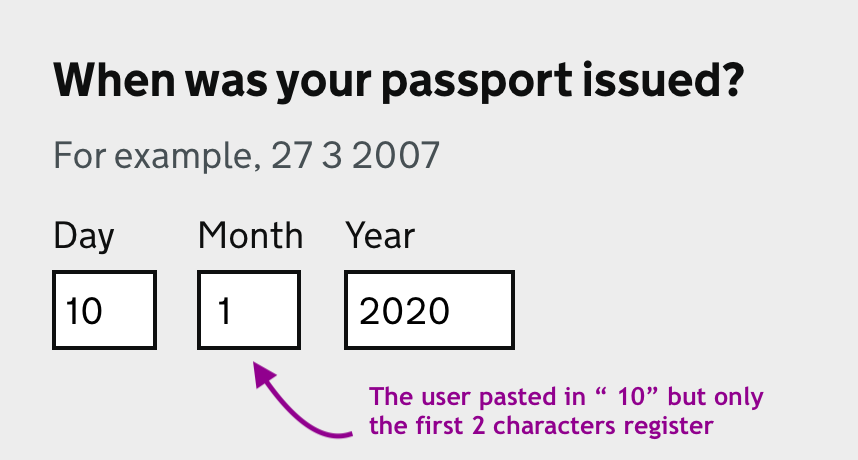
For a user copying and pasting entry into the field similarly they may not realise that only some of their input has been registered. For example if a maxlength="2" is used on a date's month field and a user pastes in " 10" (with a leading space included as part of the action), then this will register as " 1" (the first 2 characters of that paste, the "0" not registering), which whilst valid for the field (equating to "January") is not what the user meant ("October"). It then becomes dependent on the user to notice this.
For screen-reader users or those with lower visual acuity it is more impactful as they are less likely to see the lack of field update as they type.
In short, a maxlength can result in an unintended partial or incorrect data entry.
How to fix
Remove any minlength or maxlength attributes. Allow users to submit the data they wish and handle any restrictions with well crafted error messages.
Verify that any restrictions will not prevent users from entering valid data.